- NO.
- 032
- DATE
- READ
- ~9 min
- KIND
- Guide
- STATUS
- Reviewed
Serverless B2B Inquiries: Workers, D1 and Feishu
A static site plus one Worker: Turnstile, D1, signed Feishu alerts, launch switches, a cross-account domain move, and what production verified.
This is the inquiry pipeline of a B2B sourcing site. Every page is static output, and Cloudflare Worker code runs only when someone submits the form. Inquiries are stored in D1 (Cloudflare's managed SQLite database), and alerts go to an internal Feishu group (Feishu is ByteDance's workplace suite, known internationally as Lark). The pipeline was deployed on October 29, 2026, and the form isn't open to the public yet; the checklist at the end says which steps were tested in production and which one wasn't. For the project background, see Hide or Show the Factory. Domains, project names and account details here are placeholders.
What one submission goes through
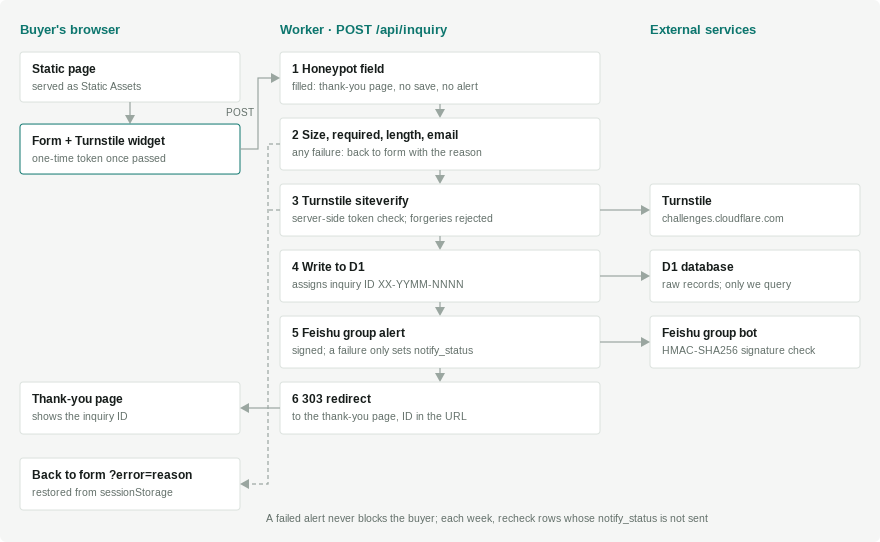
The site is hosted on Workers Static Assets: Cloudflare serves the static pages directly, without running any code. run_worker_first in the Wrangler config lists only /api/*, so that is the only path where the Worker runs.
{
  "name": "example-web",
  "account_id": "<business account ID>",
  "main": "worker/index.ts",
  "routes": [{ "pattern": "example.com", "custom_domain": true }],
  "workers_dev": false,
  "preview_urls": false,
  "assets": {
    "directory": "./dist",
    "binding": "ASSETS",
    "not_found_handling": "404-page",
    "run_worker_first": ["/api/*"]
  },
  "d1_databases": [
    {
      "binding": "DB",
      "database_name": "inquiries",
      "database_id": "<D1 database ID>",
      "migrations_dir": "worker/migrations"
    }
  ]
}
The form POSTs to /api/inquiry, and the Worker handles it in order:
- If the hidden honeypot field has a value, treat the request as a bot: redirect to the thank-you page, but don't store it or send an alert.
- Check the request body size, required fields, field lengths and email format. The field length limits are defined in one place in the Worker; when the form component changes a field, both have to change together.
- Call siteverify with the Turnstile token that came with the form, confirming the bot check on the server. A widget in the browser alone proves nothing, since an attacker can skip the page and post straight to the endpoint.
- Write to D1 and generate an inquiry ID of the form
XX-YYMM-NNNNfrom the date and an auto-increment ID. That ID and its timestamp are what we will later rely on to establish that "this buyer came through us." - Send an alert to the Feishu group bot. A failed alert doesn't affect the buyer's submission; the result goes into the
notify_statusfield, and a separate command lists the records that weren't sent, checked once a week. - Redirect with a 303 to the thank-you page, with the ID in the URL. If any step fails, redirect back to the form with the reason, and restore what was filled in from the browser's sessionStorage.
The Feishu custom bot has signature verification turned on. The algorithm uses "timestamp + newline + secret" as the HMAC-SHA256 key, signs an empty string, then base64-encodes the result. The Worker implements it with Web Crypto:
async function feishuSign(timestamp: string, secret: string): Promise<string> {
  const key = await crypto.subtle.importKey(
    'raw',
    new TextEncoder().encode(`${timestamp}\n${secret}`),
    { name: 'HMAC', hash: 'SHA-256' },
    false,
    ['sign'],
  );
  const signature = await crypto.subtle.sign('HMAC', key, new Uint8Array());
  return btoa(String.fromCharCode(...new Uint8Array(signature)));
}
The request body carries both timestamp and sign. A send counts as successful only when the bot returns code: 0; anything else writes the status code and error message verbatim into notify_status, so the alert can be resent later.
Who sees what
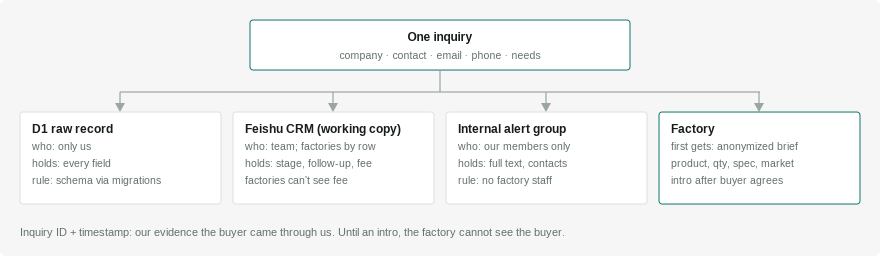
An inquiry contains the buyer's company, contact person, email and phone number, and four places see different things:
- D1 is the raw record, and only we can query it. The table schema changes only through new migration files; a migration that has already run is never edited.
- A Feishu Base table (Feishu's spreadsheet-style database) is the working CRM, tracking stages and follow-up reminders. For now each inquiry is entered by hand, about a minute apiece; once there are more than about 20 a month and manual entry clearly slows things down, the Worker will write to it directly.
- The alert group holds only our own people. The alert text is the inquiry itself, contact details included, so nobody from a factory can be in this group.
- A factory first receives only a de-identified requirements brief: product, quantity, specifications and target market, without the buyer's name or contact details. An introduction happens only after the factory confirms it can make the product and the buyer agrees.
The reason for this split is the business model. The site earns a commission only on closed deals, and once a buyer is introduced directly to a factory, the only things that can later show where that buyer came from are the inquiry ID, the timestamp and the record of the introduction.
Two switches before launch
The site has to be reachable before it officially goes public, so that partners and potential buyers can look at the pages. Two switches handle that:
inquiry.enabled: when false, the form still renders but can't be submitted, and the page is marked "submission disabled". The build also requires a Turnstile site key, and produces a working form only when both conditions hold. Turning it on waits for a final privacy policy, because the form collects personal information.seo.noindex: when true, every page outputsnoindex, nofollow, androbots.txtisDisallow: /. The repository's content check script reads the launch checklist; until every item is ticked, a commit that sets it to false fails pre-commit.
A separate account, and moving the domain
The site lives in a Cloudflare account created just for this business, kept apart from other personal projects. The domain was originally under a personal account and registered through Cloudflare Registrar, so it used Registrar's built-in move between accounts:
- Add the domain to the target account, choose a plan (the free plan is fine), and note the target account ID.
- Start the move from the domain management page in the original account. The prerequisites include: registered for more than 10 days, DNSSEC turned off, and a verified registrant email.
- The target account's email address receives a confirmation, which has to be accepted within 5 days.
The official docs say that apart from WHOIS contact information, none of the original account's configuration comes along, and for 30 days after the move the domain can't be transferred to another registrar. In practice, three things are worth knowing in advance:
- The new account assigned the domain a different pair of nameservers (the DNS servers responsible for resolving the domain). Once this move was confirmed, the registry records switched to the new pair automatically and quickly, with no manual change, and the domain in the new account then turned Active.
- Email Routing (Cloudflare's email forwarding) has to be turned on again in the new account. When the domain is added, the DNS scan brings over the MX, SPF and DKIM records, but not the forwarding rules. Destination addresses are registered per account, so the same inbox has to be verified again in the new account.
- The add-domain wizard warns that the root domain and www have no A or CNAME records. Don't rush to add them. A Workers Custom Domain creates its own DNS records on deploy, and the docs say a Custom Domain can't be created on a hostname that already has a CNAME record.
Deploy credentials
Deploys don't use a personal wrangler login. They use the business account's own account-level API token:
- The Wrangler config pins
account_id. So even if the personal login on this machine can see several accounts, a deploy can't land in the wrong one. An account ID isn't a secret and can go into Git. - The token starts from the "Edit Cloudflare Workers" template in the Cloudflare dashboard, plus D1 edit permission; write access to Workers Routes is limited to this one domain; and the token has an expiry date.
- The token and three Worker secrets (the Turnstile secret key, the Feishu webhook URL and the signing secret) live in an env file outside the repository with permission 600. They never go into Git and are never pasted into any chat.
At deploy time, the three Worker secrets are copied from the env file into a temporary file that only the current user can read, uploaded together with the code via --secrets-file, and deleted as soon as the deploy finishes:
ENV_FILE=~/.config/example/deploy.env
set -a; . "$ENV_FILE"; set +a
(umask 077; grep -E '^(TURNSTILE_SECRET_KEY|FEISHU_WEBHOOK_URL|FEISHU_WEBHOOK_SECRET)=' \
  "$ENV_FILE" > "$TMPDIR/worker-secrets.env")
npx astro build
npx wrangler deploy --secrets-file "$TMPDIR/worker-secrets.env"
rm -f "$TMPDIR/worker-secrets.env"
The deploy output lists these three under "Environment Variable", which makes them look like plaintext variables. wrangler secret list confirms that all three have the type secret_text, meaning they are stored as encrypted secrets.
What was verified, and what wasn't
| Check | Method | Result |
|---|---|---|
| Pages reachable, not indexed | Requested each main page | All 200 with noindex, nofollow; robots.txt is Disallow: / |
| 404 and default address | Requested a missing path and the workers.dev address | The 404 page works; workers.dev returns 404 |
| Endpoint method | GET /api/inquiry | 405 |
| Bot check | POST with all fields and a forged token | 303 back to the form, error=verification |
| Feishu alert | Sent a test message directly with the same signing algorithm | code 0, received in the group |
| Secret storage | wrangler secret list | All three are secret_text |
| Production database write | — | Not tested |
The last item wasn't tested. Running "verification passes → database write → alert" in production needs a token that passes Turnstile. The easiest way would be to swap the production secret for the "always passes" test secret Cloudflare publishes, send a test inquiry, and swap it back. When the coding agent handling the deploy tried that, its own permission layer blocked it as "weakening a security setting," and the step wasn't worked around. What is confirmed: the pipeline code passed an end-to-end test locally with test keys and a local D1; the production database binding and table schema were checked; forged tokens are rejected; the alert signature is correct. The remaining database write will be checked with one real browser submission when the form opens, which is exactly the path a buyer will take.
Cost
Every service in this pipeline stays within its free allowance: the Workers free plan covers 100,000 requests a day, the D1 free plan includes 5 GB of storage, and Turnstile and Email Routing are free. The only fixed cost is the domain renewal, which Registrar charges at cost; a dashboard notice says .com goes from $10.46 to $11.17 starting November 1, 2026.
Limits
The configuration and results here come from one real deploy on October 29, 2026. As of writing, the form isn't open, and the production database-write path hasn't seen real traffic. Cloudflare's dashboard labels and permission names change over time; the official docs take precedence.
Writing note: Claude Opus 5.5 drafted it, drew the figures and translated it; the author decided to publish.
Comments
Comments are powered by GitHub Discussions. Sign in with GitHub to comment. Open the matching Discussion