- NO.
- 007
- DATE
- Updated 2026-07-12
- READ
- ~15 min
- KIND
- Case study
- STATUS
- Reviewed
Moving This Blog to eigentime.org: An Honest Retrospective on a Cross-Account Cloudflare Migration
From yesyes.qzz.io to eigentime.org across two Cloudflare accounts: an honest log of every trap — deploy landmine, silent www redirect, shadowing secret.
This blog used to live at yesyes.qzz.io — a free subdomain handed out under qzz.io. The problem with a free domain isn't the name itself; it's the shared domain space it belongs to. qzz.io hosts a mixed bag of everything, and the moment I connected Google Search Console it flagged me for "Harmful downloads," with a review failing to clear it. The content was clean, but the flag wouldn't come off — it was guilt by association with the domain's reputation.
Rather than keep filing appeals, I decided to move to a clean domain of my own. I bought eigentime.org and put it on Cloudflare. It sounds like nothing more than a name change, but going through it taught me otherwise: the hard part was never moving the content — it was moving all the things buried in configuration that you never think about day to day. This is an honest record of the whole process, every trap included.
The stack, laid out first: what this post does and doesn't cover
Before the retrospective, the full inventory — map it against your own stack to see which parts of this post apply to you:
- Public site: Astro, statically built, served from Cloudflare Workers Static Assets;
- Dynamic layer: one Worker (
/api/*view and like stats, plus reserved CMS and paid-content routes); - Data: a single Workers KV namespace — every piece of dynamic data lives there (counters, visitor fingerprints, likes);
- Around it: DNS and email (Email Routing) on Cloudflare, GitHub Actions for build and deploy, comments via Giscus (the data lives in GitHub Discussions, not in my storage).
So the stateful assets this migration actually had to move were exactly: one Worker + one KV namespace + the domain bindings. Everything in this post assumes that boundary.
If your site is heavier than mine — R2 for images, D1 for data, Queues for jobs, Durable Objects for state — those resources are anchored to the account too, and in a cross-account move each one needs its own export, import, and verification path. I haven't walked those paths, and I won't invent instructions here: list each of them in your own migration checklist, read Cloudflare's official docs for that product (R2 speaks the S3-compatible API and has the Super Slurper migration tool; D1 has export/import commands), and then do what this post does for KV — write the "export → import → verify item by item" script for every class of data before you touch the cutover.
A counterintuitive call: don't move the Zone
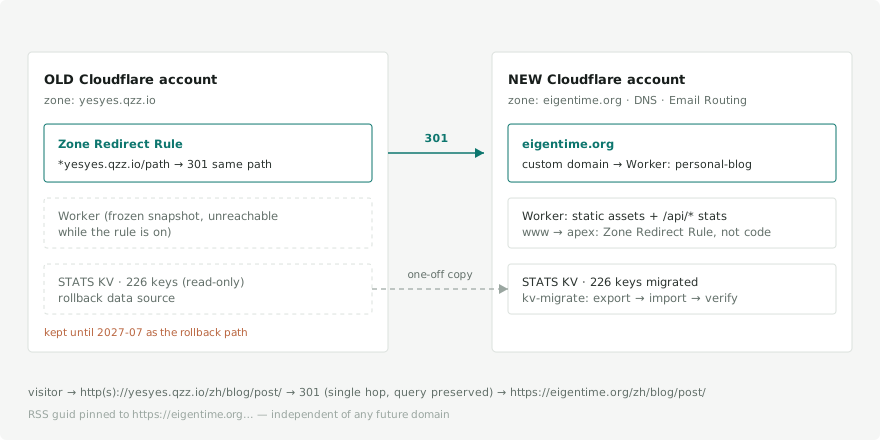
The very first fork in the road was already a little counterintuitive. The new domain eigentime.org lived under a different Cloudflare account (registration, DNS, and email routing were all over there), while the blog's Worker and its stats KV lived under the old account. A Cloudflare Worker custom domain has to bind to a Zone within the same account, so the old Worker couldn't attach to the new domain directly.
Two options: move the new domain's Zone back to the old account, or move the Worker and its data to the new account. I went with the latter. The reasoning was down to earth — the new domain's email routing, DNS, and registration were all already running happily in the new account, and moving one Worker plus roughly 40KB of KV data is far less risky than moving a registered domain, a Zone, and email. With the production domain, the production Worker, and the production data all in one account, the long-term structure is finally clean.
So the target shape became this: rebuild the Worker and the full KV in the new account, and leave the old account doing nothing but path-by-path 301s — a rollback safety net I'd keep for at least 12 months.
Moving the data: the whole KV namespace
The stats are more than the visitor number on the homepage. There are more than two hundred keys in KV: per-page view counts, likes, unique-visitor fingerprints, site-wide totals… copying just the homepage number would be the same as wiping the history to zero.
I wrote a small script, kv-migrate.mjs, with three commands: export, import, verify. The credentials for both accounts are read only from the shell environment, never written into source; the export file lands in the system temp directory by default and is caught by .gitignore — stats don't go into Git. Verification compares key by key and value-checks the aggregate counters.
This step went smoothly — 226 keys, values consistent. The real traps came later.
Trap 1: a deploy landmine on the main branch
The migration's config change — swapping the KV namespace ID for the new account's — stayed on the migration branch and wasn't merged into main. That was deliberate: once it merged, a push to main would trigger a production deploy.
The catch: binding a custom domain requires the Worker to already exist in the new account, so I had to deploy once to create it. But deploying from main wouldn't work — main's config still pointed at the old account's KV ID, and deploying that with the new account's token fails outright (the new account has no such namespace).
The right move was to bootstrap that deploy from the migration branch, whose config held the new KV. An ordering that's easy to miss: "the Worker must exist before you can bind the domain" and "the config must be correct before you can deploy the Worker" are two preconditions you have to untangle and handle separately.
Trap 2: www just wouldn't redirect
With the new domain bound and the apex returning a healthy 200, I ran the verification script — and www.eigentime.org/ came back 200 instead of 301. It wasn't redirecting to the root domain; it was serving the homepage outright.
The Worker code clearly had a www→apex 301 in it. So why wasn't it taking effect?
Because in this site's wrangler.toml, run_worker_first only listed a few dynamic paths — /api/*, /cms-api/* — alongside not_found_handling: "404-page". The result: static pages and 404s are all served straight from the Assets layer and never reach the Worker at all. Those host-level redirects at the top of the Worker (www→apex, stripping the trailing slash on .xml, and even the old-domain 301 I'd need later) don't apply to ordinary pages — only to those few API paths.
This was the most valuable lesson of the whole migration: in a "Worker + static assets" architecture, host-level redirects shouldn't lean on the Worker — they belong in a Zone-level Redirect Rule. Once I switched to a Redirect Rule, www→apex worked immediately. (A small aside: Cloudflare warns that "this rule may not take effect because www isn't proxied" — that's because the hostname you want to redirect needs a proxied DNS record; adding a proxied placeholder record fixes it. The same warning showed up again during the cutover later, with the same fix.)
Trap 3: an environment secret quietly shadowing the repo-level one
While switching the deploy account, I assumed for a while that this private repo had no "environment-level" secrets and that the workflow read its credentials from the repo level. Only later did I find there was a production environment in the repo, with the new account's credentials set at that layer.
The key point: in GitHub Actions, environment-level secrets and variables take precedence over repo-level ones. The deploy workflow runs under environment: production, so what it reads is the environment-level, new-account credentials; the repo level still holds the old account's values, quietly shadowed — which conveniently doubles as the rollback credentials.
This didn't cause a failure by itself, but it exposed a genuine hazard: any workflow that doesn't declare an environment falls back to the repo level — that is, the old account. I added an environment to a manual staging workflow that lacked one; otherwise, when triggered, it would have silently deployed to the wrong account. The "layering" of credentials is the thing most easily overlooked while debugging, and the most likely to bite.
A false alarm that gave me a scare
Doing one last KV sync before the cutover, the verification script went red and reported FAILED: the target namespace had 28 more keys than the source.
My heart sank — then I looked closely. No key was missing, and no value disagreed. Those 28 "extra" keys were real visitor fingerprints the new domain had accumulated on its own during the parallel period after it went live. My verification script demanded the two key sets be exactly equal, but for a "second sync" that assumption was simply wrong: the new domain is alive, and it grows its own keys.
I changed the verification semantics to "source ⊆ target, with matching values" — a missing key or a value mismatch counts as failure, while extra keys on the target are noted, not flagged. A tool that cries wolf is more dangerous than no tool at all: it trains you to ignore it on the day something actually breaks.
The cutover: 301 the old domain path by path
The last step: make yesyes.qzz.io 301 every path to the same path on eigentime.org.
Again — don't do this with the Worker's environment variables (same reason as Trap 2; the old Worker has the same config, and pages never reach the code). Instead, I added a Redirect Rule on the old domain's Zone: match *yesyes.qzz.io, redirect to concat("https://eigentime.org", path), preserve query strings, 301.
Verification means nailing a few things down: it must be 301, not 302; it must map path by path and not send every old URL to the homepage; query strings must survive; and the whole chain must be a single hop. Only after confirming each one with curl was the cutover clean.
One last small trap while wrapping up
I thought I was done, then spotted one lingering old-domain link on the projects showcase page. My first instinct was to fix the homepage field in the blog repo — but after editing it and regenerating the data, the old domain was still there.
It turned out that link came from the Website field of a different repo (a public template repo), while the blog repo itself is private and isn't in the public showcase list at all. "A domain reference inside the site" and "metadata synced from an upstream repo" are two different things: the former switches with a build variable, the latter changes only after you edit the upstream repo's settings and re-sync. Fixing the right repo made the problem disappear.
Things I'm still not sure about
To be honest, there are a few things I'm not one hundred percent sure of:
- Whether the SEO equity carries over cleanly. A 301 is the standard move, but this 301's source (the old domain) carries a "Harmful downloads" security flag. Whether Google discounts a 301 issued from a flagged domain, I don't know — all I can do is watch the new domain's indexing curve for a few weeks. Cutover day did bring two good signs: the new domain's GSC shows no security issues at all, and the Change of Address went through on the first submission — the very thing I'd worried would be rejected outright because of the old domain's flag.
- The precision of the counts. The final sync was "old overwrites new," and between the export and turning on the 301 there's a tiny window in which a handful of writes to the old domain went uncaptured. The counts were always approximations, but they aren't exact to the last digit.
A postscript from cutover day
In the few hours after I finished the section above, one item on the "not sure" list got crossed off, and two more traps surfaced that only revealed themselves that day:
- Email works. I sent one test message in each direction: receiving and sending both fine. "The records were preserved" finally became "verified to work" — the item on the list that had unsettled me most, crossed off.
- Rollback is no longer a hypothesis. I temporarily opened a workers.dev subdomain on the old account's Worker for a smoke test: the old site still serves fine, and its stats endpoint returns a snapshot of the old data frozen at the cutover moment — subtract that from the new account's numbers for the day and the difference is exactly the post-cutover delta. The numbers line up, so the escape route — "turn off the 301 rule and let the old site take over" — genuinely exists, rather than being a single line in a doc.
- An unforeseen side effect: RSS subscribers got "carpet-bombed" once. A feed's guid follows the full URL by default, so when the domain changed, every historical post's guid changed with it, and readers re-pushed them all as new articles. The fix was to pin the guid explicitly to a domain-independent constant: from now on the link always follows the current domain, and the guid never changes again. Lesson: check your feed's guid strategy before changing domains — it's easier to forget than the 301, and once it happens you can't take it back.
- A scary quota alert. On cutover day, Cloudflare warned that the new account's KV had used 50% of its daily free write quota. On investigation it was a false alarm: the two full import passes alone wrote more than 400 times, and that was a one-off. But it forced me to face the operational amplification in how the stats are built — a single page view fires roughly 38 KV reads. While I was at it, I added three layers of hardening: same-origin checks on the endpoint, per-session dedup, and serving the aggregate counters from the edge cache — bringing the reads per view down to about 4.
"Migration done" and "migration settled" are two different moments in time — every item above only surfaced after the cutover.
A day-two follow-up
Less than half a day after publishing this retrospective, the list grew three more entries — recorded here to round this out into a more complete domain-move checklist:
- The write quota really did run out that night. Half of the "50% warning" from the postscript turned out not to be a false alarm after all: the migration import plus launch-day traffic exhausted the daily 1,000 KV writes late that night, and the stats endpoints started throwing 500s — view counts vanished, and likes bounced back the moment you clicked them. The fix has two layers: the backend now degrades "can't write" into "reads still work" (view counters render as usual; a failed like honestly reports itself unavailable), and the frontend shows a friendly note when a like doesn't stick. The quota reset itself the next morning. Lesson: when your stats live on a free tier, quota exhaustion isn't an anomaly — it's a certainty. Design the degradation path on day one.
- The site showed up in search as
http://. The new domain was indexed the very same day (good news in itself — the 301s and the Change of Address are working; even old posts I never manually submitted got remapped), but the result displayed the http version. The cause: the new Zone never had Always Use HTTPS switched on, so cleartext requests were being served with a 200. The old Zone had it enabled long ago, yet the migration checklist never mentioned it: Zone-level security switches (forced HTTPS, HSTS) don't move with the domain — every new Zone needs them set again. - No site icon in the search results. Mostly freshness — Google's favicon pipeline lags indexing by a few days — but the investigation exposed a real gap: the site only declared an SVG icon, and
/favicon.icowas a 404, the very path Google's favicon crawler and plenty of bots and readers request blindly. Added a multi-size ICO and an apple-touch-icon as fallbacks.
These three have one thing in common: none of them is a migration failure. They're blind spots in the migration checklist — the kind that only surface after a day or two of real traffic, real indexing, and a real quota cycle. Finishing the retrospective isn't the same as finishing the retrospect; writing them back here should save the next domain-mover a couple of days.
A few takeaways
- When moving a domain, the hard part isn't the content — it's the inconspicuous dependencies: email records, the mapping keys for comments, third-party callback allowlists, upstream-repo metadata, the layering of CI credentials.
- In a static-first architecture, host-level redirects belong to the Zone, not the Worker — figure out first whether each request actually reaches your code.
- Read credentials by layer: environment-level silently shadows repo-level, so when debugging "it deployed to the wrong place," check this first.
- Make tools alarm only when something is genuinely wrong: verification semantics have to fit the real scenario, or false alarms will train you to ignore them.
- Leave a rollback path at every step: the old account's Worker, KV, domain, and that 301 rule — I'll keep them all at least until next year. "Migration done" and "safe to tear down the old" are two different moments.
Looking back after the move, this blog has always been about "give the AI a verifiable boundary first, then let it act." In a sense this migration was the by-hand version of the same idea: turn every step into an assertion you can verify with curl, stop when it's red, and only move on when it's green. The domain changed; the discipline didn't.
Comments
Comments are powered by GitHub Discussions. Sign in with GitHub to comment. Open the matching Discussion